

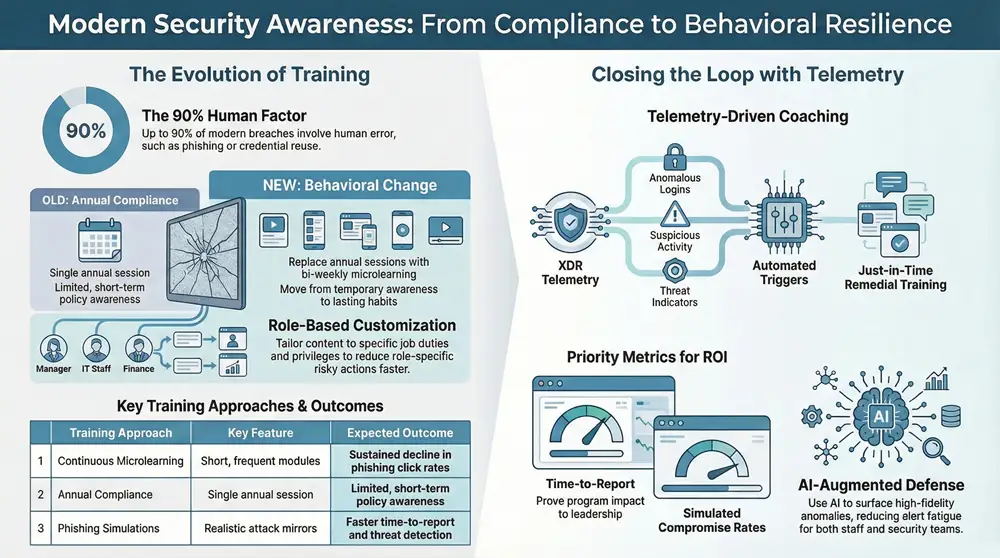
Security awareness training helps employees spot, resist, and report cyber threats while reinforcing everyday behaviors that lower organizational risk. Industry research shows roughly 60–90% of breaches involve human factors, and with AI-assisted scams and identity-based attacks on the rise, employee vigilance matters more than ever. This article breaks down what practical, measurable awareness training looks like in 2025: why it matters, how to design programs that change behavior, which metrics show progress, the core threats staff must recognize, and how an XDR platform plus a managed SOC can extend and operationalize learning. We map continuous, role-based learning to detection telemetry and incident response workflows, and finish with the cultural and leadership steps that preserve training gains and compliance readiness.
Why security awareness training matters for employees in 2025

Employees are still the most common path for initial compromise, and modern attackers move faster and with more convincing social engineering. Mistakes like clicking phishing links, reusing passwords, or misconfiguring services give attackers a foothold that automation and identity attacks quickly amplify. Training cuts both the frequency and the impact of those incidents. It shortens time-to-report, helps staff follow incident workflows, and reduces containment and remediation costs. In short, a strong awareness program is both a preventive measure and a detection-adjacent control that works alongside technical defenses.
Threats have shifted: AI-augmented social engineering and identity spoofing now mimic trusted contacts and skirt basic filters. That makes realistic simulations and adaptive, role-specific curricula — especially for new hires in the first 90 days — essential. Knowing the common human error types helps teams prioritize which behaviors to train and which technical controls to pair with education for true defense in depth.
How does human error factor into cybersecurity incidents?
Human error usually shows up as clicking malicious links, replying to spoofed messages, weak credential habits, or accidental data exposure from misconfiguration. Those errors lower the cost and time needed for attackers to gain access, turning low-sophistication campaigns into high-impact breaches. For example, a well-timed, authoritative email can overcome fatigue or onboarding gaps and lead to credential compromise and lateral movement. Measuring click rates, report rates, and repeat offenders lets organizations prioritize fixes and tailor training to the behavioral drivers behind mistakes.
Drivers such as heavy workloads, generic onboarding, and alert fatigue raise susceptibility. Addressing them requires both targeted human interventions and supporting technical controls. The next section outlines practical design principles for programs that reduce these risks and improve reporting and detection.
What works best when designing security awareness training?
Start with a clear objective: reduce risky behaviors through repeatable, measurable interventions that reflect real role responsibilities and threat telemetry. Replace once-a-year, hour-long sessions with short, frequent modules; adapt content by role and risk score; and use realistic simulations and scenario-based learning to build reflexive, secure habits. Make measurement and feedback central so behavior change maps to operational metrics and leadership can see ROI and adjust cadence or content.
Core best practices to implement now:
- Continuous microlearning: short modules delivered monthly or biweekly to reinforce retention.
- Role-based customization: content tailored to job duties, privileges, and exposure.
- Realistic phishing simulations: mirror real threat patterns and follow up with corrective coaching.
- Telemetry-driven prioritization: use detection signals to focus training where risk is highest.
- Clear KPIs and feedback loops: track click rates, reporting times, and repeat behaviors to prove improvement.
- Executive reporting and governance: tie training outcomes to compliance and risk metrics for leadership visibility.
These practices balance learning science with operational realities and set the stage for data-driven refinement. The table below contrasts common training approaches and the outcomes you can expect.
Intro to the comparison table: This table contrasts common training approaches by feature and the expected outcomes or metrics they most directly influence.
The takeaway: continuous, role-based approaches sustain behavior change, while once-a-year sessions usually only produce temporary awareness. The sections that follow explain how to operationalize continuous, role-based training and measure its effectiveness.
How do continuous and role-based programs improve security?
Continuous, role-based training aligns cadence and content with actual risk and cognitive principles like spaced repetition. Role-specific curricula map tasks, privileged access, and likely threat vectors to modules that emphasize relevant scenarios. A common cadence is microlearning every 2–4 weeks with quarterly role-focused deep dives; this reinforces learning and adapts to new threats. Telemetry — for example, anomalous logins or phishing click trends — should guide which roles get prioritized coaching.
Operationalizing this requires content libraries, simulation pipelines, and a governance loop that adjusts frequency based on measured behavior change. By tying detection signals to training prioritization, teams can concentrate efforts where they reduce risk fastest and show concrete improvements to leadership.
Which metrics show a security awareness program is working?
Success depends on a mix of behavior, process, and outcome metrics that together signal lower human risk and stronger incident handling. Track phishing simulation click rates over time, measure time-to-report for suspicious items, and monitor simulated compromise rates to understand residual exposure. Also watch repeat-offender counts versus improvement cohorts to target coaching where it’s needed most.
Key metrics to collect include:
- Phishing simulation click rate: percentage of users who click simulated malicious links.
- Time-to-report: median time between receiving a suspicious message and reporting it.
- Simulated compromise rate: share of simulated credential captures during tests.
- Behavior change index: a composite of repeat incidents versus resolved risky actions.
Regular dashboards and quarterly reviews translate these metrics into program adjustments and executive reporting, which helps sustain investment in awareness initiatives.
How ShieldWatch XDR extends and reinforces employee training

An XDR platform amplifies awareness programs by turning technical telemetry into actionable training priorities and by shortening dwell time when human error occurs. ShieldWatch’s enterprise-grade XDR unifies detection across endpoints, network, cloud, and identities, combining AI automation with a human-led SOC to speed verdicting and containment. When a user clicks a malicious link or shows anomalous behavior, XDR telemetry can flag that account for targeted coaching and update simulation priority lists — closing the loop between detection and education.
Below is an EAV-style comparison showing how platform telemetry maps to training actions and frequency adjustments.
Intro to the telemetry-to-training table: This table links types of platform telemetry (entity) to attributes observed and the training-driven values or actions that should follow.
This mapping shows how XDR signals generate precise training audiences and how automated detection closes the loop from incident to education. ShieldWatch’s AI Agent Hyperautomation and pre-built SOAR playbooks reduce manual triage, while threat-hunting history helps shape realistic simulation scenarios.
Practical examples below show where XDR improves human vigilance and where our managed SOC fills coverage gaps. The following sections explain AI-driven signals and SOC functions in operational terms.
How does AI-driven detection support human vigilance?
AI detection supports human vigilance by surfacing high-fidelity alerts and behavioral anomalies that indicate users or workflows needing education. Baseline models learn normal login and communication patterns, then flag credential-stuffing attempts or email patterns that imitate internal messages, enabling timely, relevant simulations. AI also trims false positives, lowering alert fatigue so security teams can coach high-risk users instead of chasing noise.
For training programs, AI lets you prioritize: users flagged by behavioral baselines get modules addressing the exact tactic that triggered the alert, improving transfer of learning and reducing repeat mistakes. That focused approach boosts both prevention and detection.
How do managed SOC services extend incident response beyond training?
Managed SOCs provide continuous human oversight and rapid containment that training alone can’t guarantee, especially outside business hours or during large incidents. A 24/7 SOC runs detection logic, applies automated containment via SOAR workflows, and escalates incidents to internal teams while preserving evidence and following playbooks. ShieldWatch’s managed SOC blends AI automation with human analysts to deliver sub-8.5 second threat verdicts and containment within minutes for high-fidelity alerts — dramatically shrinking attacker dwell time.
SOC telemetry also feeds training by revealing common failure modes — particular phishing templates or timing patterns — so training teams can update simulations and cadence. That feedback loop between SOC response and education reduces both impact and recurrence.
Which cyber threats should employees be trained to spot?
Train employees on a focused set of threat classes that account for most initial compromises: phishing and social engineering, credential-based identity attacks, insider misconfigurations and data mishandling, and ransomware entry vectors. Each class has clear indicators and response steps staff can learn to escalate. Design modules that map observable signs to immediate actions — verify the sender, report to security, avoid entering credentials — so staff can act quickly and limit damage. Prioritize the threats most relevant to your tech stack and threat intelligence.
The quick reference table maps threat types to common indicators and the recommended employee actions or training focus areas.
That mapping clarifies which behaviors and reporting steps each threat class requires and sets the agenda for focused modules. The next sections drill into social engineering tactics and core credential hygiene practices.
Phishing and social engineering use psychological levers — urgency, authority, curiosity, reciprocity — to prompt unsafe actions like revealing credentials or opening malicious attachments. Attackers craft spear-phishing and business email compromise campaigns that mirror internal workflows, making detection harder. Train employees to verify requests—especially financial or credential-related ones—via a secondary channel and to follow clear escalation steps for suspicious messages.
Reporting channels must be simple and fast so staff can escalate suspected messages without hesitation. Simulations should vary tone, sender, and pretext to build resilient recognition skills. Reinforcing verification steps lowers the chance of falling for more sophisticated social engineering.
Why focus on password hygiene and multi-factor authentication?
Good password hygiene and MFA make stolen credentials far less useful and blunt credential-stuffing attacks that exploit reused passwords. Training should teach secure password creation, encourage password manager use, and explain organizational rotation and complexity policies. Describe MFA types — push, hardware tokens, authenticator apps — and their trade-offs, and require MFA for privileged accounts.
Monitor adoption rates, failed MFA attempts, and reductions in credential-based incidents to measure training impact in this area. Strong MFA adoption plus solid password habits materially lowers identity-driven breach risk.
How do you build a security-minded culture that outlasts training?
A resilient cybersecurity culture pairs visible leadership sponsorship with governance, incentives, and continuous reinforcement so secure behaviors become second nature. Leaders must communicate priorities, fund ongoing training and detection tools, and include security metrics in performance conversations. Embed secure defaults, simple reporting channels, and recognition programs to reduce friction and normalize doing the right thing.
Pair cultural efforts with measurement that links training results to compliance and operational KPIs so governance bodies can track progress and allocate resources effectively. The following sections describe leader actions and engagement mechanics that drive lasting improvements.
What should leaders do to champion security awareness?
Leaders should visibly back security by funding continuous learning, enforcing policies consistently, and making security metrics part of exec reporting. Practical actions include budgeting for simulation platforms and detection tools, requiring security on quarterly dashboards, and recognizing teams that improve. Leaders should model secure behavior — using MFA and following reporting processes — to set expectations and remove stigma from error reporting.
When leadership ties security outcomes to business metrics and performance reviews, security becomes a shared responsibility rather than a checkbox, enabling long-term behavior change.
How do gamification and ongoing reinforcement lift engagement?
Gamification and continuous reinforcement boost engagement by turning learning into repeatable, measurable activities that reward the right behaviors without downplaying risk. Use leaderboards for reporting, badges for role-specific module completion, and micro-challenges that refresh core habits. Keep rewards aligned with correct actions like timely reporting, not risky experimentation.
Measure engagement alongside behavior change — track module completion, simulation response quality, and reductions in risky actions — so gamification drives real outcomes. To maintain momentum, surface gamified results in manager conversations and governance reporting so incentives align with organizational objectives.
For teams looking to pair cultural and training investments with technical enforcement and evidence, ShieldWatch’s managed SOC and compliance-readiness tools provide executive dashboards and artifacts for governance reviews. Our platform integrates detection, response, and compliance across endpoints, network, cloud, and identities and supports SOC 2, HIPAA, CMMC 2.0, and ISO 27001 readiness — helping leadership show training ROI through fewer incidents and clearer regulatory alignment. Consider linking product pages and demo requests to internal governance resources to simplify next-step evaluations.
This integration — unified detection and response, continuous education, and visible leadership — is how organizations build a resilient security posture.
Frequently Asked Questions
What challenges do organizations commonly face when rolling out security awareness training?
Common challenges include employee resistance, measuring real effectiveness, keeping content current as threats evolve, and allocating time and budget. Training that feels like a checkbox or is overly generic won’t stick. Overcome these issues with leadership support, continuous content updates, role-specific material, and by embedding training into everyday workflows so it becomes part of how people work.
How often should employees receive security awareness training?
Regular, short touchpoints work best. Aim for microlearning every 2–4 weeks, with quarterly role-specific deep dives. This cadence reinforces habits and adapts to new threats. Also run refresher training after significant incidents or major changes in the threat landscape.
What role does feedback play in improving training?
Feedback is essential. Use simulation results, surveys, and performance metrics to spot weaknesses and refine content. Regular feedback loops let you tailor material to real behaviors and keep training relevant and engaging — which improves outcomes over time.
How can organizations measure the ROI of their training programs?
Measure ROI with behavior-focused KPIs: phishing click rates, time-to-report, simulated compromise rates, and repeat-offender counts. Compare incident trends before and after training and link improvements to reduced remediation costs and compliance benefits. Dashboards and executive summaries help translate those gains into business value.
What methods most effectively engage employees in training?
Keep content short, relevant, and interactive. Use scenario-based learning, realistic simulations, and gamified elements like leaderboards and badges to motivate participation. Involving employees in content design and regularly updating scenarios to reflect actual threats increases ownership and retention.
How do you make security awareness part of organizational culture?
Embed security in day-to-day work by simplifying reporting, recognizing secure behavior, and having leaders model good practices. Include security metrics in performance discussions and governance. When secure behavior is expected and rewarded, it becomes part of the organization’s operating rhythm rather than a separate task.
Conclusion
Effective employee security awareness training reduces human error and strengthens your incident response posture. By combining continuous, role-based learning with realistic simulations, telemetry-driven prioritization, and visible leadership, organizations can produce measurable behavior change and better compliance readiness. To move forward, consider tailored training programs backed by ShieldWatch’s XDR and managed SOC — a practical way to turn learning into lower risk. Invest in your team’s knowledge now to protect your organization against evolving threats.
Be rewarded for every click—join our affiliate program today!
Promote, refer, earn—join our affiliate program now!
Promote our products and earn real money—apply today!